Milton Turns an Old iPad Into a Family Command Center
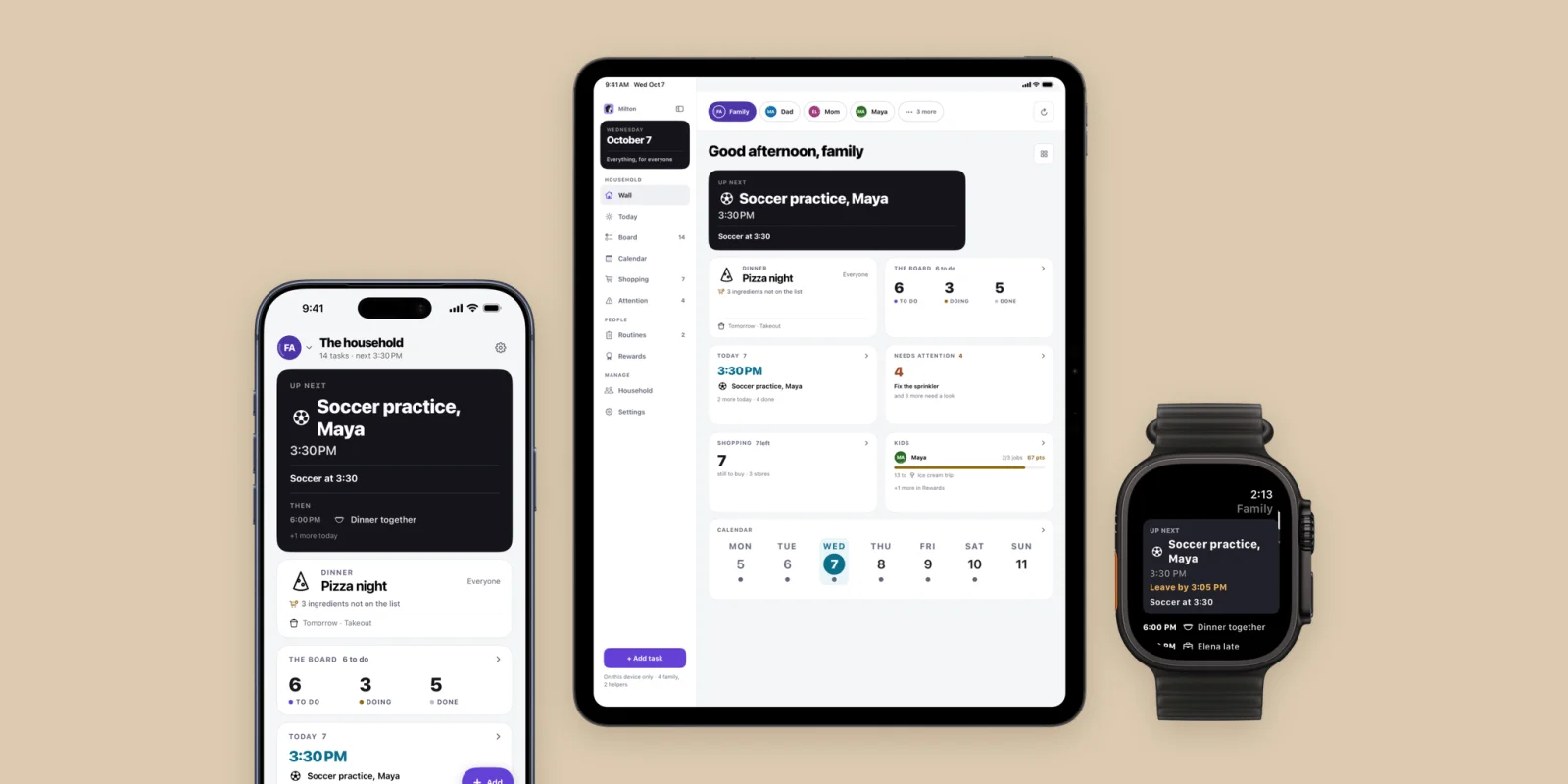
Apple just released HomeView, a smart display designed to sit at the center of your home. Before you buy one, check the iPad in your drawer. Milton, a new app, turns an older iPad running iPadOS 17 or later into a household hub that covers much of the same ground. That's a bolder claim than it sounds at first. A dedicated display is a new purchase with a new device to set up and manage, while a repurposed tablet is something you already own.
A dashboard you actually control
Milton is built around a customizable dashboard. You decide which tiles get the prime real estate: calendar, chores, shopping lists, weather, the clock, a photo frame, a to-do list, and more. Whatever you arrange on the family iPad shows up there, and everything can sync to iPhones when you need to check something from another room or from the store. Here's the thing: a wall dashboard only works if people trust it enough to glance at it. In my experience, the usual failure mode for household tools isn't ugliness. It's staleness, when the information on screen drifts out of date within a week and nobody bothers to fix it.
Customization matters more than it seems. A fixed layout forces your family to adapt to the app, and that's usually where abandonment starts. Letting you decide which tiles get top billing means the screen can reflect how your household actually runs, whether that's a calendar-heavy week or a kitchen that lives on shopping lists. (and this is the part most people overlook) the sync is what turns a fridge tablet into a shared surface instead of a single screen that only helps whoever happens to be standing in front of it.
The chore system is the feature that caught my attention. Kids earn points for finishing tasks, and parents set rewards for reaching certain totals. Parents can also sign off on each chore, which closes the obvious loophole of a kid tapping "done" without doing anything. For families trying to build routines, that's more useful than one more calendar tile. The sign-off step is the part I'd focus on. Gamified chore systems often run into the same problem: the reward goes to whoever clicks fastest, not whoever did the work. Requiring a parent to approve each item puts the judgment back where it belongs, and it shifts the dynamic from policing to agreement.
The recipe feature is the surprise. Photograph pages from a cookbook and Milton parses them into a step-by-step guide. Missing an ingredient? It goes straight onto the shopping list. That ties meal planning to grocery runs, which is where most household apps fall apart. Recipe tools usually live in their own silo, so you copy ingredients by hand and forget half of them by the time you reach the store. Pulling the gaps directly into the list removes that friction. I'd still test how the parsing handles cramped, handwritten, or heavily illustrated pages before trusting it with a Sunday dinner, because text-extraction features tend to be strongest on clean printed pages.
Why it exists
The developer, Josh, is a software engineer, and the origin story is practical. He frames the app as a response to a household problem rather than a product bet. He tells it in his own words:
I'm a software engineer, and my partner is an oncology pharmacist. She wanted one place that kept our household organised: the calendar, the chores, the shopping, what's for dinner. Skylight is expensive, and the iPad apps that do this charge a subscription every year. We wanted something that fit our lives, connected us as the Apple family we already are, and didn't cost families a fortune.
Like most families, we had an old iPad lying around. We put it in a case with a magnet, stuck it to the fridge, and that became Milton.
That fridge-mounted setup is the real pitch. Plenty of families already own a tablet that's one upgrade cycle past its prime, and Milton gives it a job again. Josh's account is personal, and I don't want to read more into it than he says. But the logic is familiar. A household with a shared calendar, a partner working in a demanding clinical role, and a weekly grocery habit has needs that a generic note app doesn't address. The pitch also says something about where the product sits. It isn't trying to replace your phone or your calendar software. It's a shared surface that sits between them, which is a narrower and more defensible position than "the family operating system."
What it costs
The core organizer features are free, and that's a generous starting point. Adding more people, syncing across devices, or sharing with family members' personal devices requires a purchase. Milton Individual is a one-time $4.99. Milton Family costs $14.99 and automatically shares with your iCloud Family Sharing group.
The structure rewards a closer read. The one-time payment for the individual tier sidesteps the yearly subscription model that Josh cites as a reason for building the app in the first place. The family tier plugs into iCloud Family Sharing, which means it fits the account setup many households already have. That said, the line between free and paid is where the real decision lies. If the free tier covers your household, you're paying nothing. If it doesn't, the one-time price is modest next to a recurring fee, but it still assumes the app earns its place on your fridge.
Milton is still young, and the real test is whether your household keeps using the dashboard after the novelty fades. You can run that experiment for free. For more on what the app can do, the developer's website covers the rest of the feature set. I'd treat any new family app the same way: run it in the free tier for a few weeks, and watch whether anyone besides the person who installed it actually opens it.
What this means if you're deciding
If you're weighing HomeView against a repurposed iPad, the decision is less about features than about what you already own. A dedicated display is a new device with its own setup, its own spot on the wall, and its own role in the house. Milton asks you to put to work hardware you may have stopped thinking about. The cheapest smart display is the one that's already plugged in, and that's a real advantage if the software works for your family.
The bigger question is whether the category holds together. Household hubs have been tried many times, and the pattern is familiar: an appealing demo, then a slow drift as the people who were supposed to use it stop. Milton's bet is that a free core, modest upgrades, and a tablet most families already own will avoid that drift. I think that's a sensible bet. Still unproven, though. Your fridge will tell you more than any review can.