iOS 27 Reshapes Notification Access, Prioritizing Siri AI on iPhone and iPad
With the arrival of iOS 27, Apple has made noticeable changes to how users interact with notifications on the iPhone and iPad, which have relied on Notification Center since iOS 5 in 2011. This marks a significant evolution, not only in interface design but also in how users are expected to engage with their devices. While most updates tend to polish existing features, this one raises fundamental questions about user interactions with key functions.
Currently available in beta, iOS 27 introduces a new dynamic that shifts the user experience, particularly as Siri AI takes center stage. By default, accessing Notification Center remains similar to past iterations. However, enabling Siri AI alters a familiar swipe gesture, repositioning how users historically accessed notifications. Users will need to rethink their muscle memory with multitasking, possibly affecting productivity in the short term.
Siri AI Alters Swipe Access
In iOS 27, users can invoke Siri AI by swiping down from the center of the top edge of their devices. This gesture, which previously opened Notification Center, now launches Siri AI instead. While users can still access Notification Center by swiping down from the top-left corner, the change marks a significant shift in gesture behavior, highlighting a trend that may further integrate AI into daily tasks. Alerts in Notification Center transition from the top left, indicating a move to a smaller interactive area for notifications.
The push for Siri AI access is evident as Apple allocates a substantial portion of the top edge to facilitate engaging with the new functionality. This prioritization underscores Apple's commitment to advancing Siri's role within the operating system. You'll find it’s not just a superficial tweak—this design choice suggests that Apple sees voice assistant technology as central to how users will interact with their devices moving forward.

The last notable adjustment to Notification Center access was when Apple shifted the Control Center gesture from a swipe-up to a swipe-down motion for the iPhone X. That iteration set a precedent, changing how gestures are perceived by users. This latest change further alters users' expectations, as it requires a readjustment not only in gesture habits but also in how users engage with their digital environment.
Notifications Shift to the Top Left
In a notable shift in iPadOS 27 beta 1, Notification Center finds itself relegated to a smaller area towards the top left of the screen, primarily to accommodate Siri AI. This adjustment raises questions about whether such a design will enhance usability or create frustration for users accustomed to a familiar layout. Adjusting the display settings to hide the AM/PM time or date further reduces Notification Center's available space, making it a challenge for users to get the full context of their notifications.
Subsequent iterations in beta 2 refined this positioning, giving a more balanced design with Notification Center occupying the left side and Control Center on the right. This creates a narrower yet more intentional region dedicated to invoking Siri. This layout invites users to reconsider how they multitask, possibly making Siri a more integrated helper rather than a mere accessory. But here’s the part most people overlook: the learning curve could deter users from leveraging Siri fully in the short term.
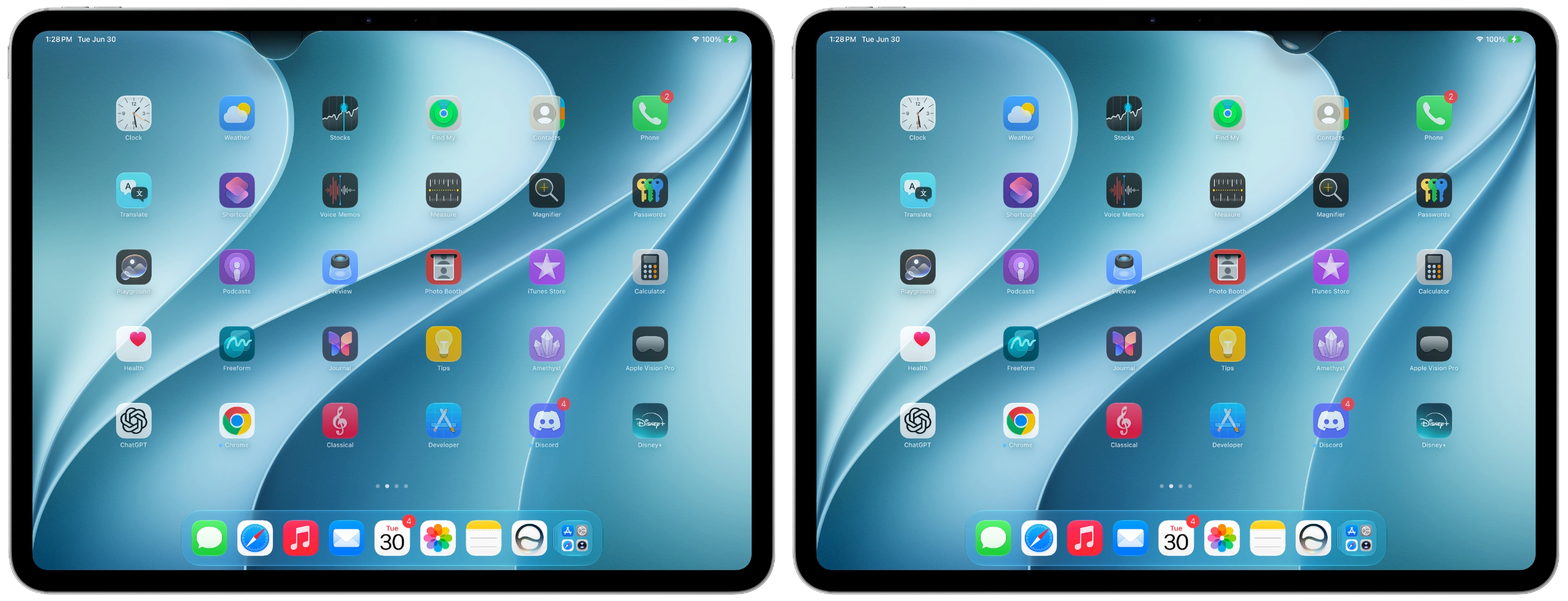
After years of ingrained muscle memory, users will need time to adapt to this shift. Initial feedback is notably positive regarding the functionality of the new Siri AI. This suggests a favorable reception awaits as users get accustomed to the changes. But it may take some time to appreciate the enhanced capabilities of Siri, particularly regarding multitasking or performing tasks hands-free. If you're working in this space, adaptability may be one of your greatest assets moving forward.
Enhance Your Apple Experience
Apple AirTag 2 | Add Find My tracking to keys, bags, bikes, more
AirPods 4 | Apple’s newest wireless headphones
AirPods Pro 3 | Apple’s best wireless headphones
Beats USB-A to USB-C Cable | The official CarPlay cable
Wireless CarPlay Adapter | No more plugging in required
Withings Body Comp | Best smart scale for Apple Health
Future Implications of iOS 27 Changes
The transition to Siri AI as a primary interaction point is more significant than it looks. It signals a shift toward voice-first interaction, marking a potential turning point for mobile operating systems. As companies like Apple prioritize AI functionality, similar systems typically will follow suit. This could potentially lead to a more unified experience across devices by emphasizing voice commands as the dominant interface. Users will likely need to prepare for this shift and adapt their usage patterns accordingly.
Moreover, as Siri becomes central to user interaction, Apple will need to ensure that its performance meets heightened expectations. A lack of responsiveness or inaccuracies could sour users, contradicting the goal of enhancing user experience. Integrating such AI deeply into the operating system can be a double-edged sword; while it offers potential, it also raises the stakes in terms of execution. Brands often have to navigate this complex terrain carefully.
It remains to be seen how users will react over time. Will they welcome these changes enthusiastically, or will frustration lead to a regression to older usage patterns? The days ahead will be pivotal as users navigate these updates and adjust their expectations and habits. One thing’s clear: Apple is aiming to stake a massive claim on the future of personal computing—one voice command at a time.