Harnessing Your Surface Pro NPU for Local LLM Integration Using R
TLDR: This article outlines the process of using the Neural Processing Unit (NPU) on a Surface Pro 11 to interact with large language models (LLMs) through R, drawing insights from Microsoft's guidelines.
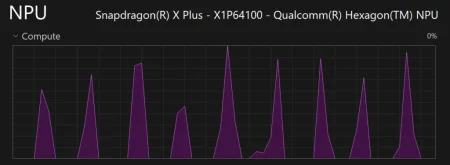
Having intensely engaged with large language models (LLMs) over the last couple of years, I recently turned my attention to the capabilities of my Surface Pro 11’s integrated NPU. Although my RTX 4060 typically does the heavy lifting, I've been curious about how well the NPU can perform when running LLMs locally. Unfortunately, tools like Ollama and LM Studio currently lack direct support for NPU functionality, making it a bit of a challenge to satisfy my curiosity. This situation isn't unique; users often discover limitations when trying to push hardware boundaries, particularly with specialized tasks such as processing extensive AI models.
Setting Up Foundry Local
To get started, you’ll need to install Foundry Local on your machine. This is typically done with a simple Bash command:
npm install foundry-local-sdk-winml openai
Make sure that Foundry is included in your PATH environment variable. This allows your operating system to know where to locate the installed software. If you're unfamiliar with modifying the PATH variable, it's beneficial to familiarize yourself, as this is a common requirement across various software packages. Detailed instructions can be found in the Microsoft documentation linked here.
The R Code
Microsoft provides a guide that I adapted for this process, starting with Python and incorporating R code:
# Load necessary packages
library(ellmer) # LLM chat interface compatible with OpenAI
library(httr2) # for handling requests

# Define the model and prompt
ref_model_alias <- "qwen2.5-0.5b"
ref_prompt <- "What is the golden ratio?"

# Function to load the model and ensure service is running
fnc_foundry_load <- function(alias) {
if (Sys.which("foundry") == "") {
stop("`foundry` CLI not found on PATH. Install Foundry Local first.")
}
system2("foundry", c("service", "start"))
system2("foundry", c("model", "download", alias))
system2("foundry", c("model", "load", alias))
invisible(alias)
}

# Discover service base URL dynamically
fnc_foundry_endpoint <- function() {
tmp_status <- system2("foundry", c("service", "status"), stdout = TRUE)
tmp_status <- iconv(paste(tmp_status, collapse = " "), to = "ASCII", sub = " ")
tmp_hostport <- regmatches(tmp_status, regexpr("[0-9]{1,3}(\\.[0-9]{1,3}){3}:[0-9]+", tmp_status))
if (length(tmp_hostport) == 0) {
stop("Could not parse endpoint from status: ", tmp_status)
}
paste0("http://", tmp_hostport[1])
}

# Resolve model ID required for REST API
fnc_model_id <- function(base, alias) {
tmp_models <- request(paste0(base, "/v1/models")) |> req_perform() |> resp_body_json(simplifyVector = FALSE)
tmp_ids <- vapply(tmp_models$data, \(m) m$id, character(1))
tmp_hit <- tmp_ids[grepl(alias, tmp_ids, fixed = TRUE)]
if (length(tmp_hit)) tmp_hit[1] else tmp_ids[1]
}

# Unload the model when done
fnc_foundry_unload <- function(alias) {
system2("foundry", c("model", "unload", alias))
invisible(alias)
}

# Load the model and set up the endpoint
fnc_foundry_load(ref_model_alias)
ref_endpoint <- fnc_foundry_endpoint()
ref_model_id <- fnc_model_id(ref_endpoint, ref_model_alias)
cat("Model loaded and ready.\n")

# Set up chat session with the local endpoint
mod_chat <- chat_openai_compatible(
base_url = paste0(ref_endpoint, "/v1"),
name = "foundry-local",
credentials = \() "not-needed",
model = ref_model_id,
echo = "output"
)

# Send prompt to the local model
rlt_reply <- mod_chat$chat(ref_prompt)
While my exploration of local LLMs through the Surface Pro NPU may pose questions about performance, it's a satisfying exercise in expanding the capabilities of AI in practical applications. The allure of running advanced models locally lies not just in potential speed or reduced latency, but in the control it offers. This is more significant than it looks—many users prefer local computing to avoid the unpredictability and security issues associated with cloud data processing. By navigating the waters of local processing, you’re often exploring uncharted territory, which can be frustrating but ultimately rewarding.
Implications for Future Use
The implications of successfully implementing LLMs through local infrastructure like the NPU on a Surface Pro 11 extend beyond personal experimentation. For developers, optimizing local environments can lead to enhanced model responsiveness and decreased reliance on cloud services, which can include hefty subscription fees. The potential for cost savings is enticing, especially for startups and independent developers. Additionally, localized model execution can improve data privacy, a key concern as users become increasingly aware of how their data is handled online.
If you’re working in this space, embracing this technology could differentiate your products or research from competitors. So many are still focused on purely cloud-based solutions, but the duality of using both local and cloud resources can be powerful. To this end, exploring how existing frameworks can be adapted to local environments—like the adaptations I've made here—might provide insights that can propel projects forward. And yet, challenges remain. As with many tech endeavors, the need for constant updates and maintenance of libraries, as well as keeping ahead of software dependencies, ensures that the journey is ongoing.